
Different problems require different solutions
The company's prepress department includes personnel equipped with digital printers, sample cutting machines, X-rite, and eXact spectrophotometers. The production department has multiple Heidelberg and Roland offset printing presses and UV printing presses, as well as a complete set of post-processing equipment, including automatic die-cutting machines, automatic hot stamping machines, automatic laminating machines, automatic box gluing machines, automatic bag making machines, gift box equipment, automatic lid forming machines, slotting machines, book box assembly machines, and folding box forming machines.
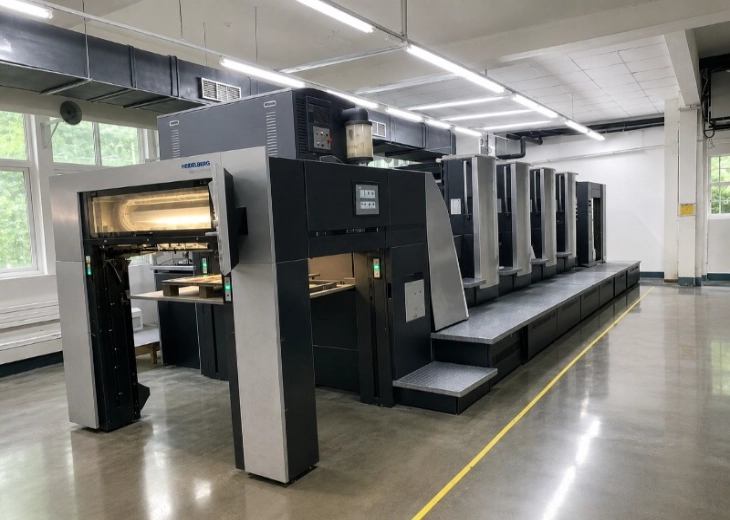
Why Choose Heidelberg Printing Presses
I. Printing Precision (Core of Color Box Quality)
Overprint Accuracy:±0.01–0.03 mm, nearly zero error for multi-color registration
Color Stability: Color difference < 1%, consistent color for batch and long-run jobs
Dot Reproduction: 200 lpi+ high-definition screening, sharp text, fine patterns, smooth gradients
Paper Transport: 10‑micron positioning, stable running without misalignment for both thin and thick paper
II. High Speed & Productivity (Core of Factory Efficiency)
Speedmaster XL106: Max. 21,000 sheets per hour, top‑tier efficiency for long runs in the industry
Automatic Plate Changing: Autoplate completes in 2–3 minutes, fast job change with minimal waste
Automatic Cleaning & Setup: One‑click automatic control for ink train, blanket, and ink‑water balance
III. Structural & Process Stability (Durability & Reliability)
German Precision Manufacturing: Micron‑level assembly, high‑strength frame, no deformation under long‑term high load
Seven‑o’clock Cylinder + Double‑diameter Impression: Minimal paper transfer, light indentation, no dot deformation
AirTransfer Non‑contact Feeding: Scratch‑resistant and anti‑set‑off, ideal for color boxes and premium paper
Dual Side Lays + Skew Lays: Strong adaptability to thick paper, corrugated board, and specialty paper
IV. All‑in‑One Multi‑Process Inline Production (Color Box Advantage)
Supports inline UV, reverse printing, matte finish, hot stamping, cold stamping, embossing, varnishing, and lamination
Completes multiple processes in one pass, reduces waste, improves efficiency, and ensures precise registration
Modular Units: Our company is equipped with multiple presses (e.g., Heidelberg 4‑color, Manroland 6+1, Heidelberg 8+1 UV presses), suitable for complex color box and gift box processes
View More

Common Printing Problems of Offset Ink
Poor Ink Transfer
Symptom: Insufficient ink transfer from the ink fountain to the fountain roller or ink stripping, resulting in low print density.
Causes:
1.Insufficient ink in the ink fountain
2.High thixotropy of the ink
3.Poor ink flow
4.Water absorption and emulsification of ink in the ink fountain
Poor Drying
Symptom: Ink layer remains wet, sticky, and non‑resistant after long‑term storage.
Causes:
1.Excessive ink emulsification, insufficient paper water absorption, acidic salts in fountain solution affecting drying
2.Excessive ink coverage
3.High paper moisture content
4.Strong paper acidity
5.Low or no ink absorption of the paper
6.Incorrect fountain solution parameters
7.Insufficient oxygen in stacking environment
8.Low ambient temperature and high relative humidity
9.Excessive addition of ink oil, viscosity reducer, or anti‑skinning agent
10.Black ink over 1 year old: drier absorbed by carbon black, slow
Chalking
Symptoms: After the ink is transferred and dried on paper, the pigment adheres weakly to the substrate and falls off as powder when rubbed.
Causes:
1.The paper has large capillary absorption capacity. During ink penetration, the binder is absorbed into the paper together with pigment, leaving the pigment exposed.
2.Excessively fast penetration rate of the ink
3.High ink concentration with an ultra-thin ink film
4.Slow oxidative drying speed
5.Excessively acidic paper causing poor drying
6.Low pH value of fountain solution
7.Overly soft ink that cannot maintain its form after printing
8.Excessive water supply from fountain solution leads to severe ink emulsification and separation of binder and pigment
Poor Abrasion Resistance
Symptoms: Prints are prone to scratches during printing, storage and handling.
Causes:
1.Insufficient wax content in the ink for high-gloss printing, resulting in inadequate wear resistance.
2.Fast ink absorption of paper triggers ink chalking
3.Poor drying caused by ink or paper issues
4.Uneven paper surface
5.Dirty paper delivery path with accumulated ink lumps, paper dust and dried spray powder, which cause scratches
6.Reverse printing conducted before the ink completes penetration
7.Improper layout design: large-area light screen with thin and discontinuous ink film leading to low film strength, especially noticeable with blue ink
Paper Picking and Linting
Symptoms: In the printing process, residual ink from previous printing and paper fibers are pulled back by the subsequent blanket, accumulate on blankets and CTP plates, and finally enter the ink system.
Causes:
1.Excessive water on paper surface causes severe ink emulsification. The ink viscosity drops sharply after transfer, resulting in weak adhesion to paper.
2.Excessive dust and paper lint on the paper surface
3.Loose paper structure and low sizing strength
4.Excessively high printing speed leads to abnormal increase of ink viscosity
5.Excessive printing pressure makes separation between paper, ink and blanket difficult
6.Overly high ink viscosity
7.Poor on-machine stability of ink with rapid viscosity increase
8.Low printing temperature reduces the temperature of ink on rollers and raises ink viscosity
9.Low paper temperature in winter increases paper brittleness and reduces surface strength
10.Improper blanket selection causes difficult separation of non-image areas
11.Inappropriate detergent dissolves plasticizers from blankets; the blankets then absorb solvents from ink during printing, causing a sharp rise in viscosity
Plate Scumming
Symptoms: Ink adheres to the non-image areas of the printing plate.
Causes:
1.Low surface tension of fountain solution leads to insufficient water supply to non-image areas
2.Crystallized and ink-contaminated water rollers result in insufficient water delivery
3.Excessive printing pressure
4.High grease content of ink spreads to non-image areas
5.Overly soft ink prone to over-emulsification
6.Improper pH value and excessive conductivity of fountain solution
7.Overheated ink rollers thin the ink and induce emulsification
8.Insufficient exposure of CTP plates leads to oleophilic non-image areas; shallow and fine plate grain results in poor water retention
9.Surfactants and salts in paper dissolve into fountain solution and cause plate scumming
General Tinting
Symptoms: Faint color appears partially or fully on the plate. The tint recurs quickly even after cleaning the intact printing plate.
Causes:
1.Overly soft ink is easy to emulsify at high printing temperature
2.Excessive addition of ink diluent and tack reducer leads to overly thin ink
3.High hydrophilicity of pigments; use of water-soluble pigments and dyes for offset printing
4.Poor water resistance of ink. Binder separates from pigment during emulsification and pigments dissolve into water phase
5.Excessive pressure between doctor rollers and distributing rollers causes water-ink separation and tinting
6.Hardened doctor rollers fail to remove scattered ink from non-image areas effectively
7.Severe impact of water rollers on the plate causes roller bouncing due to gripper gaps, resulting in tinting at the gripper edge. Increasing water volume offers slight improvement but may aggravate tinting
8.Ink contamination on water rollers
9.Excessive water supply from fountain solution leads to severe ink emulsification
10.Improper pH value of fountain solution. Some pigments with poor acid and alkali resistance are dissolved by fountain solution
11.Surfactants and salts in paper dissolve into fountain solution and damage the hydrophilicity of CTP plates
Sheet Sticking
Symptoms: Ink on the printed side of the upper sheet transfers to the surface of the lower sheet, causing image smudging. Sheets stick together when stacked in large quantities.
Causes:
1.Slow penetration and drying of ink
2.Low ink concentration with excessive ink application
3.Severe ink emulsification slows down ink penetration and drying
4.Slow oxidative film formation of ink
5.Static electricity generated during thin paper printing in low-humidity environment makes sheets adhere tightly
6.Insufficient spray powder or excessively fine powder particles
7.High basis weight of paper and over-high stacking height
Ink Mist and Ink Splashing
Symptoms: Fine ink particles drift into the air, defined as ink mist; large ink droplets fall around rollers, defined as ink splashing.
Causes:
1.Insufficient viscoelasticity of ink
2.Low ink concentration with excessive ink application
3.Severe ink emulsification
4.Improper setting of printing pressure
5.Damaged roller surface leads to poor ink transfer
6.Excessively high printing speed
7.High ambient and machine temperature thins the ink
8.Narrow printing width causes long-term accumulation and emulsification of ink at both ends of rollers without timely transfer, resulting in ink splashing
9.Static electricity generated during printing
Color Fading and Discoloration
Symptoms: Printed products change color or gradually fade during storage.
Causes:
1.Oxidative yellowing of binders in ink, especially varnish
2.Poor UV resistance of ink
3.Mismatch between acid-base property of paper and acid-alkali resistance of ink
4.Excessive IPA added to fountain solution. Some alcohol-sensitive pigments bleed during drying
5.Poor alkali resistance and solvent resistance of pigments when water-based varnish or lamination is applied
Gloss Ghosting & Gas Ghosting
Symptoms: On solid patterns printed on the reverse side, areas corresponding to solid printed areas on the front side show obviously higher gloss than other images.
Causes:
1.Reverse printing conducted right after large-area solid printing with heavy ink coverage
2.Excessive oil absorption of paper after double-sided solid printing
3.Excessive ink application for solid printing on the reverse side
4.Reverse printing performed before the ink on the front side dries completely
5.Tightly stacked prints trap small molecular gases produced by oxidative drying, which cannot escape and accumulate between sheets
Mechanical Ghosting
Symptoms: Unwanted faint patterns appear on solid areas and shadow areas, such as residual images from previous printing, or uneven color density along the printing direction.
Causes:
1.Ultra-thin ink film
2.Excessively high transparency of ink
3.Overly high viscosity of overprinting ink. The previous printed pattern is transferred back to distributing rollers during overprinting and reprinted as ghost images in the next rotation
4.Incomplete cleaning of blankets with residual images from previous jobs
5.Unreasonable layout design. Large density difference between solid areas and light tone areas in the horizontal direction causes ghosting due to uneven ink consumption
Dot Gain & Dot Blurring
Symptoms: Dots of the original artwork and printing plate cannot be reproduced accurately on prints, resulting in enlarged, reduced or blurred dots.
Causes:
1.Improper pressure setting between rollers, printing plate and blanket
2.Overly soft ink with insufficient viscoelasticity
3.Insufficient ink concentration with excessive ink application
4.Ink prone to emulsification, which softens the ink and reduces its viscoelasticity
5.Excessive ink load on rollers with excessive water and ink volume
6.Overly soft blankets and rubber rollers
7.Excessive printing pressure
8.Low sensitivity of the printing plate leading to unclear plate output
Unstable Color Density
Symptoms: Uneven color tone during continuous printing; color density becomes darker or lighter after machine stop and restart.
Causes:
1.Insufficient pressure between rollers in the ink system
2.Aging rubber rollers in the ink system
3.Uneven water supply from the water system
4.Poor water resistance of ink leads to easy emulsification and water ingress into the ink system
5.Defective surface coating of blankets with accumulated residual ink, spray powder and paper lint, resulting in uneven surface
6.Poor moisture absorption of paper. Residual water on non-image areas is carried to the next printing unit and causes poor ink transfer and unstable color density
View More